Zend Framework 2 - Subqueries (Subselect) and Table Gateway
This one can be a bit of a pain, and I had a few folks ask me how to do this, thought I'd share here and pass a link around. The question takes many shapes!
How can I perform a subquery in ZF2?
How do I properly escape a subquery in my Table Gateway?
I'm trying to echo my query to debug it and am getting warning messages from ZF2?
It's not terribly difficult, but the docs are a bit piecemeal on the net. I've tried to find links on StackOverflow to help as well, but haven't found any good ones. Here goes - hope it helps!
The function in your AbstractTableGateway will look like such, pay attention to fetchAllWithVotes:
namespace Application\Model\Table;

use Zend\Db\Adapter\Adapter;
use Zend\Db\Adapter\AdapterAwareInterface;
use Zend\Db\Sql\Expression;
use Zend\Db\Sql\Select;
use Zend\Db\TableGateway\AbstractTableGateway;

class SongsTable extends AbstractTableGateway implements AdapterAwareInterface
{
    protected $table = 'songs';

    public function setDbAdapter( Adapter $adapter)
    {
        $this->adapter = $adapter;
    }

    public function fetchAllWithVotes( $user_id )
    {
        $adapter   = $this->getAdapter();
        $resultset = $this->select( function( Select $select ) use ( $user_id, $adapter ) {

            $sub1   = new Select( 'votes' );
            $sub1->columns( array( 'total' => new Expression('COUNT(*)') ) )
                    ->where( array( 'id' => new Expression( 'song_id' ) ) );

            $sub2   = new Select( 'votes' );
            $sub2->columns( array( 'total' => new Expression('COUNT(*)') ) )
                    ->where( array( 'id' => new Expression( 'song_id' ) ) )
                        ->where( array( 'user_id' => $user_id ) );

            $select->columns(
                array(
                    'id',
                    'title',
                    'ytlink',
                    'total_votes' => new \Zend\Db\Sql\Expression( '?', array( $sub1 ) ),
                    'your_votes' => new \Zend\Db\Sql\Expression( '?', array( $sub2 ) ),
                )
            );

            var_dump( $select->getSqlString( $adapter->getPlatform() ) );

        });

        return $resultset->toArray();
    }
}
Pretty self-explanatory - all the guts are there! Hope this helps :)
VirtualBox: Mounting Shared Folders on Ubuntu Server 13
Want to mount VirtualBox folders on Ubuntu under an OSX 10.8 host? Differences between aptitude packages and the VirtualBox Guest Additions ISO, compounded to "security fixes" in recent versions of VirtualBox that disable symlinks can be a pain. Read below, it's actually quite simple.
Starting, I assume that you have VirtualBox 4.3.4+ installed, and have loaded up your Ubuntu Server VM -- but don't spin it up yet.
Configuring Your Shared Folder
Inside VirtualBox, head to your VM's Settings panel and visit the Shared Folders tab. Click the Add (+) icon on the right hand side and specify the folder on your host (OSX) that'll get shared in your guest (Ubuntu). Check Auto-mount & Make Permanent, click Ok. [I noticed a strange thing, "Make Permanent" isn't always visible. Click "OK" to save & close, then double-click your shared folder entry to make it reappear in the modal dialog.]
Make a mental note your share's name; you'll need it in the steps that follow. Mine is webroot in the screenshot affixed.
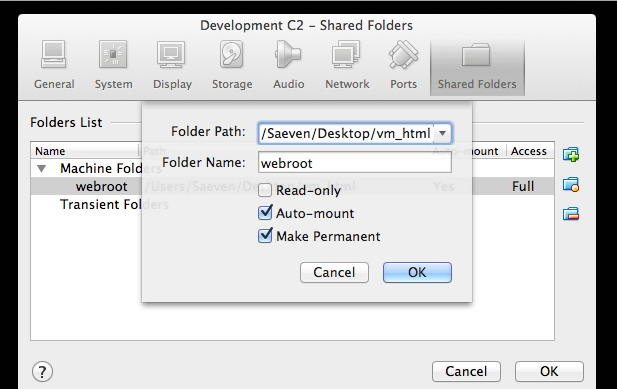
Screenshot of shared folder config panel
Enabling Symlinks (optional)
If you need Symlinks in your guest, run this command before you start your VM. This gotcha was a pain. Switch out "webroot" for your share's name, and VM_NAME for the actual name you give your VM.
VBoxManage setextradata VM_NAME VBoxInternal2/SharedFoldersEnableSymlinksCreate/webroot 1
Start & Prep Your VM
Start your VM, log in via SSH, and then:
- insert the Guest Additions CD image (Devices > Insert Guest Additions CD image in the menu)
- mount the CD with: sudo mount /dev/cdrom /media/cdrom
- before we can install what's on the CD, we need to build a few requirements: sudo apt-get install -y dkms build-essential linux-headers-generic linux-headers-$(uname -r)
- now we can use what's on the CD, install with: sudo /media/cdrom/VBoxLinuxAdditions.run
Because you are on Ubuntu Server, it'll crap out at the last step where it tries to install X11 dependencies - but don't worry about it - it'll still work. (Could not find the X.Org or XFree86 Window System.)
Reboot your VM at this point, then shell back in.
Mount Your Folders, Like Magic
I wanted to mount something that'd get used by nginx; so I mounted them under the www-data uid and gid (33). I also added www-data to vboxsf.
sudo adduser www-data vboxsf
Mount with this command thereafter (recall your share name noted earlier):
sudo mount -t vboxsf -o uid=33,gid=33 webroot /var/www/html/
You can discover a user's ID with the id command.
AWS Kinesis, PHP, CURL and Signature V4
Well - I got my hands on a limited preview of AWS Kinesis! It promises to be one of the most insane realtime data-grepping vacuums ever built. Remains to write, I was very excited to tackle it this afternoon (got my welcome email last night).
After I plowed through the morning's chores, I made a coffee, read the docs -- and then Googled around to see if any low-level libraries were available; I knew inside that I was in for the library build given our needs, but I was hopeful to avoid building the signature. Quickly found a piece I'd met before, the AWS SDK for PHP and its Signature V4 class. This thing is rigged to be configurable, and despite my intuition, I loaded it up and ran a few tests. It was far too slow. That old adage about performance vs. configurability always holds doesn't it. The abstractions and options might be great for multipurpose usage, but my Kinesis usage is scheduled to fire several thousand times a second - the overhead on the SDK is simply too great.
Back to the drawing board then, I built a test from scratch that used cURL - with success (after some hacking at it admittedly, the API error messages are a bit cryptic at times). I thought others could benefit from this, and so I post it here!
https://gist.github.com/Saeven/7832090
(I put a Gist up for now, sorry to make you jump through hoops)
I'll follow up with our real world experience on the Kinesis

Solve "MySQL server has gone away", Doctrine2 & Zend Framework 2
Doctrine2 and Zend Framework 2 are a recommended relationship, but if you have a long-running task or daemon that's dying because of connection loss, this article might help.
If you're coding with Zend Framework 2, and have adopted Doctrine 2 for all the right reasons, you've probably done a good deal of brain bending to rid yourself of table gateway thinking, to set up your Entities with proper annotations, and have done some slick DI to inject the right dependencies in the right places. This was pretty much the path I'd taken, thoroughly embedding the lot into a framework I've been developing for a few months.
Integral to that framework, is a whole reporting aspect that blends entities from many of my ZF Modules, crunches up a bunch of good stats for my partners, co-workers and clients, and drops them into an AWS Redshift BI warehouse for later grinding. I'd contend that I had done everything by the book, using Memcache and Gearman to parallelize data gathering with these PHP jobs, to one Monday roll into work and see a stalled status flag: a big old 2006 in one of the Gearman task logs.
I immediately guessed that the connections being used by Doctrine were dying with no auto-reconnect, and Googled very quickly thinking "Someone out there has to have solved this." Makes sense, it's related to wait_timeout; but how to fix?
Everything I read at that point pointed to using a dummy select in conjunction with some try catch blocks to assert the connection's heartbeat. Coded like such:
    /**
     * Assert/Revive a Doctrine repository connection
     * @param \Application\Mapper\AbstractDoctrineMapper $R Doctrine repository
     * @throws PDOException
     */
    protected function assertDatabaseRepositoryConnection(\Application\Mapper\AbstractDoctrineMapper &$R)
    {
        $EM = $R->getEntityManager();
        $DBC = $EM->getConnection();

        // connections die because of process length sometimes, have to kick them back into shape
        try {

            $DBC->query("SELECT 1");

            if (self::DEBUG)
                $this->setStatus(" ++ EM connection was alive, continuing");

        } catch (\Exception $e) {

            if (self::DEBUG)
                $this->setStatus(" ++ EM connection had died.  Reviving.");

            $newEM = $this->getServiceLocator()->create('doctrine.entitymanager.orm_default');

            if (self::DEBUG)
                $this->setStatus(" ++ Created New EM.");

            $R->setEntityManager($newEM);

        }
    }
I tested locally, writing a few unit tests to make that select fail to ensure that the connection would be recreated with a new SPL hash, and it was. Seemed right, so the code began its march up our GIT repositories, right to our stat-grinding fleet. Reset, start, wait...
Approximately 2 days later, same old "MySQL server has gone away" error. Poking some more, an IRC chat on Freenode's #doctrine had someone identify that may be caused by Zend Framework's shared services. I edited my \Application's getServiceConfiguration() and set shared to false for my database orm connection.
 public function getServiceConfig()
    {
        return array(
            'invokables' => array(
                ...
            ),
            'initializers' => array(
                ...
            ),
            'factories' => array(
                ...
            ),

            'shared' => array(
                'doctrine.entitymanager.orm_default' => false
            ),
        );
    }
You guessed it. I run the Unit Tests, things seem fine (no difference in fact), so I push it up to our cloud and restart the process. 2 days later, same darned thing!
It was probable at this point that the mass of queries I was running at such irregular intervals caused the Dummy SQL to validate, but the connections would die in the time that exists between the Dummy SQL and the ER commit. That or gremlins. Trying to find documentation for connection wrappers for Doctrine 2, I found an enhancement request on the Doctrine portal that was pretty darned close to what I needed. Do I think this should be a standard option too? OH YES! In the interim though I adjusted the older files at that link so that they comply with the version of Doctrine 2 that I am using. It's been in production usage for about a day now, and it's working well, so I wanted to give back & share. Big thanks to Marco Pivetta from Freenode's #Doctrine for chipping in, and to Dieter Peeters for writing up that JIRA thread & code. Here's my take on it:
1. Adjust your Doctrine DB Config
'doctrine' => array(
        'connection' => array(
            'orm_default' => array(
                //'driverClass' => 'Doctrine\DBAL\Driver\PDOMySql\Driver',
                'driverClass' => '\Application\Model\Doctrine\DBAL\Driver\PDOMySql\Driver',
                'wrapperClass' => '\Application\Model\Doctrine\DBAL\Connection',
                'params' => array(
                    'host' => 'host',
                    'port' => '3306',
                    'user' => 'user',
                    'password' => 'password',
                    'dbname' => 'dbname',
                    'driverOptions' => array(
'x_reconnect_attempts' => 10,
                    ),
                )
            )
        )
    ),
2. Install the Following Connection and Driver Wrappers
Click here to download the source code
Note: Updated on Sep 16, included more verbose error output, and a "stall retrying" condition for when our ISP's DNS would hit the proverbial fan.
3. Keep Calm, and Use Doctrine Normaly
No need for example, for the database connection assertion routines that are recommended in quite a few posts you'll find on this subject, that I pasted at the start of this article. It was a nice feeling to peel that stuff out of the code.
This does get rid of the problem, and given the nature of the sandbox where these problems surface, it's usually a few days in the toilet if you're digging blind. I hope this helps! One note, it only works for statements outside of transactions. That was a moot point for me given the nature of the long tasks.
Capturing auth events with ZfcUser
Had a hell of a time trying to find how to tap into ZfcUser's auth event (the registration events are really well documented, but this one...). Figured I'd write about it while the glue-it-back-hair-glue gently massaged onto my scalp dries.
I had a requirement to tap into ZFCUser's auth event to log IP addresses and times in addition to auth record ID. At the time at which this blog post was authored, documentation was nonexistent. If you've stumbled here, you're probably commiserating after having Googled and found dead-end StackOverflow posts!
Here's the solution! (Assuming you've already set up a custom user, see this blog post)
In your custom user Module's (e.g., FooUser per link above) onBootstrap event, add this code:
$sm = $e->getApplication()->getServiceManager();
 $zfcAuthEvents = $e->getApplication()->getServiceManager()->get('ZfcUser\Authentication\Adapter\AdapterChain')->getEventManager();

 $zfcAuthEvents->attach( 'authenticate', function( $authEvent ) use( $sm ){
        try
        {
            $remote     = new \Zend\Http\PhpEnvironment\RemoteAddress;
            $remote->setUseProxy( true );

            $mapper     =  $sm->get( 'auth_log_mapper' );
            $log_entity = new \FooUser\Entity\UserAuthenticationLog;
            $log_entity->populate(
                    array(
                   'user_id'       => $authEvent->getIdentity(),
                    'auth_time'     => new \DateTime( "now" ),
                    'ip_address'    => $remote->getIpAddress()
                )
            );

            $mapper->save( $log_entity );
            return true;
        }
        catch( \Exception $x )
        {
            // handle it
        }
});
Your mileage may vary, I left the guts of my custom user functions in there in case it helps. The $authEvent->getIdentity() returns an integer; and if you don't return true, it breaks the chain.
So simple, what a PITA to deciper! Hope this helps someone - I'd be a day younger.